Introduction
Software Development is a tedious process. From the customer's requirements to the finished product, the software process that is used determines the organization and flexibility of the project.

To make life easier, there is a framework defining tasks performed at each step in the software development process called Software Development Life Cycle (SDLC).
Software Development Life Cycle
Software Development Life Cycle is a structure followed by a development team within the software organization. It consists of a detailed plan describing how to develop, maintain and replace specific software. The life cycle defines a methodology for improving the quality of software and the overall development process.
This term is also known as the software development process.
There are a number of approaches or models to develop softwares - called “Software Development Process Models” which are discussed in detail in this document.
But every software development model has the following phases :
- Requirement Gathering and Analysis
- Design
- Implementation or Coding
- Testing
- Deployment
- Maintenance

\
Why do we need a Software Life Cycle Model?
When a software product is being developed by a team there must be a clear understanding among team members about when and what to do. Otherwise it would lead to chaos and project failure.
This problem can be illustrated by using an example. Suppose a software development problem is divided into several parts and the parts are assigned to the team members. From then on, suppose the team members are allowed the freedom to develop the parts assigned to them in whatever way they like. It is possible that one member might start writing the code for his part, another might decide to prepare the test documents first, and some other engineer might begin with the design phase of the parts assigned to him. This would surely lead the project to be a failure.
A software life cycle model defines entry and exit criteria for every phase. A phase can start only if its phase-entry criteria have been satisfied. So without software life cycle model the entry and exit criteria for a phase cannot be recognized. Without software life cycle models, it becomes difficult for software project managers to monitor the progress of the project.
Different Software Life Cycle Models
There are various different models or methodologies for software development . A few important ones are as follows :
- Waterfall Model
- V Model
- Structured Evolutionary Prototype Model
- Spiral Model
- RAD Model
- Agile Model
Choosing the type of model is very important since the development and testing are carried out in accordance with the model. The models mentioned above are discussed in brief detail.
The Classical Waterfall Model
The Waterfall Model is intuitively the most obvious approach to software development. In a waterfall model :
- Each phase must be completed fully before the next phase can begin.
- There should be no uncertain requirements
- .At the end of each phase, a review takes place to determine if the project is on the right path and whether or not to continue or discard the project.
- In this model the testing starts only after the development is complete. In waterfall model phases do not overlap.

Advantages:
- This model is simple and easy to understand and can be used for small projects with very well defined requirements.
- All other life cycle models are essentially derived from the Waterfall Model. Thus this can can be called ‘the theoretical approach to develop software’.
To appreciate other models, it is necessary to learn the waterfall model.
Disadvantages:
- In any practical situation, it is not possible to develop software using this model.
- Once an application is in the testing stage, it is very difficult to go back and change something that was not well-thought out in the concept stage.
- No working software is produced until late during the life cycle.
- High amounts of risk and uncertainty.
- Not suitable for the projects where requirements are at a moderate to high risk of changing.
V Model
V model means ‘Verification’ model or ‘Validation’ model.
- Just like the waterfall model, this is also a sequential execution of processes. Each phase must be completed before the next phase begins.
- Testing of the product is planned in parallel with a corresponding phase of development.

Advantages of V-model:
- Simple and easy to use.
- Testing activities like planning, testing happens well before coding. This saves a lot of time. Hence higher chance of success over the waterfall model..
- Avoids the downward flow of the defects.
- Works well for small projects where requirements are easily understood.
Disadvantages of V-model:
- Very rigid and least flexible.
- Software is developed during the implementation phase, so no early prototypes of the software are produced.
- If any changes happen in midway, then the test documents along with requirement documents has to be update.
Structured Evolutionary Prototyping Model
Software Prototyping refers to building software application prototypes which display the functionality of the product under development but may not actually hold the exact logic of the original software.
Software prototyping is becoming very popular as a software development model, as it enables to understand customer requirements at an early stage of development. It helps get valuable feedback from the customer and helps software designers and developers understand about what exactly is expected from the product under development.
- Developers build a prototype during the requirements phase
- Prototype is evaluated by end users
- Users give corrective feedback
- Developers further refine the prototype
- When the user is satisfied , the prototype code is brought up to the standards needed for a final product.

Advantages of Prototype model:
- Users are actively involved in the development
- Since in this methodology a working model of the system is provided, the users get a better understanding of the system being developed.
- Errors can be detected much earlier.
- Quicker user feedback is available leading to better solutions.
- Missing functionality can be identified easily
- Confusing or difficult functions can be identified
Disadvantages of Prototype model:
- Leads to implementing and then repairing way of building systems.
- Practically, this methodology may increase the complexity of the system as scope of the system may expand beyond original plans.
- Incomplete application may cause application not to be used as the full system was designed
- Incomplete or inadequate problem analysis.
Spiral Model
The spiral model is similar to the incremental model, with more emphasis placed on risk analysis. The spiral model has four phases: Planning, Risk Analysis, Engineering and Evaluation. A software project repeatedly passes through these phases in iterations (called Spirals in this model). The baseline spiral, starting in the planning phase, requirements are gathered and risk is assessed. Each subsequent spirals builds on the baseline spiral.
Diagram of Spiral model:

Advantages of Spiral model:
- Risk analysis done very intricately.
- Good for large and mission-critical projects.
- Strong approval and documentation control.
- Additional Functionality can be added at a later date.
- Software is produced early in the software life cycle.
Disadvantages of Spiral model:
- Can be a costly model to use.
- Risk analysis requires highly specific expertise.
- Project’s success is highly dependent on the risk analysis phase.
When to use Spiral model:
- When costs and risk evaluation is important
- For medium to high-risk projects
- Requirements are complex and users are not 100% sure of their needs.
- Significant changes are expected (research and exploration)
4.5 RAD Model
RAD model is Rapid Application Development model. It is an incremental model. In RAD model the components or functions are developed in parallel as if they were mini projects. The developments are time boxed, delivered and then assembled into a working prototype. This can quickly give the customer something to see and use and to provide feedback regarding the delivery and their requirements.
Diagram of RAD-Model: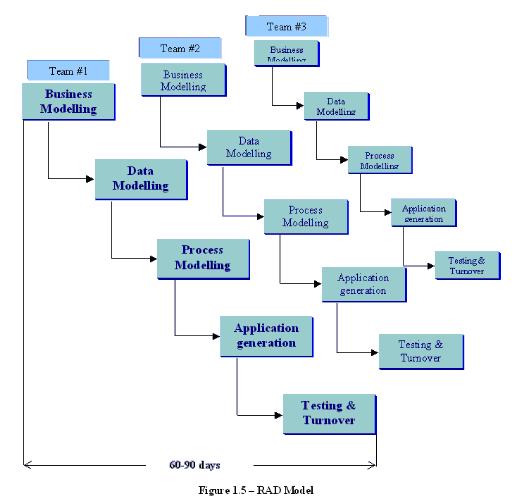
Advantages of the RAD model:
- Reduced development time.
- Increases reusability of components
- Quick initial reviews occur
- Encourages customer feedback
- Integration from very beginning solves a lot of integration issues.
Disadvantages of RAD model:
- Depends on strong team and individual performances for identifying business requirements.
- Only system that can be modularized can be built using RAD
- Requires highly skilled developers/designers.
- High dependency on modeling skills
- Inapplicable to cheaper projects as cost of modeling and automated codegeneration is very high.
When to use RAD model:
- RAD should be used when there is a need to create a system that can be modularized in 2-3 months of time.
- It should be used if there’s high availability of designers for modeling and the budget is high enough to afford their cost along with the cost of automated code generating tools
Agile Model:
Agile development model is also a type of Incremental model. Software is developed in incremental, rapid cycles. This results in small incremental releases with each release building on previous functionality. Each release is thoroughly tested to ensure software quality is maintained. It is used for time critical applications. Extreme Programming (XP) is currently one of the most well known agile development model.
Diagram of Agile model:

Advantages of Agile model:
- Customer satisfaction by rapid, continuous delivery of useful software.
- People and interactions are emphasized rather than process and tools. Customers, developers and testers constantly interact with each other.
- Working software is delivered frequently (weeks rather than months).
- Face-to-face conversation is the best form of communication.
- Close, daily cooperation between business people and developers.
- Continuous attention to technical excellence and good design.
- Regular adaptation to changing circumstances.
- Even late changes in requirements are welcomed
Disadvantages of Agile model:
- In case of some software deliverables, especially the large ones, it is difficult to assess the effort required at the beginning of the software development life cycle.
- There is lack of emphasis on necessary designing and documentation.
- The project can easily get taken off track if the customer representative is not clear what final outcome that they want.
- Only senior programmers are capable of taking the kind of decisions required during the development process. Hence it has no place for newbie programmers, unless combined with experienced resources.
When to use Agile model:
- When new changes are needed to be implemented. The freedom agile gives to change is very important. New changes can be implemented at very little cost because of the frequency of new increments that are produced.
- To implement a new feature the developers need to lose only the work of a few days, or even only hours, to roll back and implement it.
- Unlike the waterfall model in agile model very limited planning is required to get started with the project. Agile assumes that the end users’ needs are ever changing in a dynamic business and IT world. Changes can be discussed and features can be newly effected or removed based on feedback. This effectively gives the customer the finished system they want or need.
- Both system developers and stakeholders alike, find they also get more freedom of time and options than if the software was developed in a more rigid sequential way. Having options gives them the ability to leave important decisions until more or better data or even entire hosting programs are available; meaning the project can continue to move forward without fear of reaching a sudden standstill.
Case Study : Extreme Programming Software Process Model for projects in Colleges and Universities
Extreme Programming (XP) is a lightweight software development process for small teams dealing with vague or rapidly changing requirements. XP breaks with a number of traditional software engineering practices.
- Documentation is almost entirely non-existent. The only "documentation" is a set of index cards on which the team members scribble planned features of the system. Other than that, the source code is the only documentation.
- There is no software specification. Executable test cases, written before thecode is developed, serve as a substitute.
- There is no separate design or testing phase. Instead, design, implementation and test are done together, in small increments.
- There is an explicit prohibition against design for change; only the simplest possible design satisfying the feature of the moment should be implemented.
- There are no formal reviews or inspections. However, XP prescribes a combination of special practices instead. The major ones are pair programming (all code is written by two programmers, working together at one terminal), frequent integration of changes, automated regression testing, development in small increments, and occasional restructuring (called refactoring).
Important Terminologies:
Pair Programming: All programming tasks are done in
pairs at one display, keyboard, and mouse;
functionality required for a small set of new features.
Iteration Planning: Designing and implementing only the
Testing: Test cases specify the functionality and are rerun
continuously;
Refactoring: Restructuring the code while retaining its
Scalability: What is an appropriate team size for XP?
A course was held in the university of Karlsruhe in the summer term 2000.The participants were CS graduate students who needed to take a practical training course as part of their degree requirements. Most of the students had experience with team work, but only one with pair programming. Only one student had developed moving graphical displays of the sort needed for
the project. Twelve students began the course; one dropped after the first three weeks because of lack of time; the rest completed.
In the first three weeks, students solved small programming exercises to familiarize themselves with the programming environment and to learn XP practices. The exercises introduced jUnit (the testing framework used throughout the course), pair programming, the test practices of XP (write
test cases before coding, execute them automatically with jUnit), and refactoring. The remaining eight weeks were devoted to a project on visual traffic simulation. The course language was Java. All students had experience with Java from their early undergraduate courses.
Number of participants = 12
Qualification = graduate students
Course language=Java
Testing tool= jUnit
First exercise - Matrix class
Second exercise-Visualization tool (VT)
Third exercise-Extension of VT with HTML or text output
Project-Traffic simulation
Duration of the course - 8 weeks,about 40h per team total
Experiences :
Pair Programming :
- Most of the pairs used the following two-display technique:On one display, they implemented while the other showed the relevant Java documentation.
- When a pair ran into difficulties, one team member consulted the documentation while the other studied the code. When asked if a single display would have been enough, 75% declined.
- Although this approach was used in a Java environment, it is an indication to soften the strict rule of pair programming ata single terminal.
- Another aspect of pair programming is learning from each other. The students confirmed that they learned something from their partners. The topics ranged from matrix
- algebra to editor commands. 43% of the participants statedthat they had learned something from pair programming, but this effect declined with the duration of the course.
In summary, pair programming still suffers from some waste of time and from an unclear division of work. It is also unclear whether the main benefit of pair programming,
higher quality, could be achieved by a less personnel intensive approach such as pair inspections.
Iteration Planning:
Given a set of new features to implement, XP’s guidelines say to develop the simplest possible solution. The rationale is that software changes are cheap and no time should be wasted developing unneeded generality.
At this point, it is unclear whether minimalistic design is merely a matter of training, or actually a bad idea. It is clear what must be done, though, if one wants to practice the XP approach with somewhat experienced personnel: withhold information about future extensions. This is probably the approach for the next iteration of the XP course.
Testing :
There are two aspects of testing in XP: first, to write the test cases before coding, and second, to make them execute automatically for regression testing.
At the end of the course, the students were convinced of the benefits of writing test cases prior to coding. It is the testing approach that the students considered the best practice in the final review of the course. 87% stated that the execution of the test cases strengthened their confidence in the code and all of them were planning to try out this practice after the course.
In summary, there are situations where test cases are difficult to automate (graphics) or are wasted effort (during prototyping). But writing test cases early, especially when there are no specifications, and regression testing were seen as beneficial.
Refactoring:
Refactoring provide a software skeleton at the beginning from which they can start development. The students never got to a point where they needed to refactor. One team had a complete design that did not need to be improved, the other team had a situation where one team sort of refactored a prototype, but without the benefit of test cases. Lack of refactoring may be caused by a combination of several factors: the small size of project and doing full rather than minimal designs.
Conclusions and Concerns :
- Pair programming is adopted easily and an enjoyable way to code. However, it is unclear what type of work not to do in pairs and how best to structure pair interaction.
- Design in small increments is difficult. Holistic design behavior may be difficult to abandon and more research is needed to test whether this is actually a good idea. If one wants developers to design in small increments, at least one pair member should be trained in it.
- Writing test cases before coding is not easily adopted and is sometimes impractical.
- Due to the communication overhead, XP as is does not scale well. It is definitely meant for small teams (6-8 members).
- XP requires coaching until it is fully adopted.
.

No comments:
Post a Comment